Analytics

顯示具有 VISUAL STUDIO 標籤的文章。 顯示所有文章

2014年5月8日 星期四

[Oracle]解決 Windows7 Asp.net出現ORA-12154: TNS: 無法解析指定的連線 ID (Solve Windows7 Asp.net appear ORA-12154: TNS: could not resolve the specified connection ID)


問題
執行連接Oracle db時,出現ORA-12154: TNS: 無法解析指定的連線 ID的錯誤!
但是PLSQL Developer卻正常連線,因此問題應該是出現在asp.net config設定上


解決方法

web.config將oracle連線改為用tns方式指定,如下:

<add key="DB_ORACLE" value="User ID=Oraclename;Password=123456;Data Source=(DESCRIPTION=(ADDRESS_LIST=(ADDRESS=(PROTOCOL=TCP)(HOST=192.168.1.99)(PORT=7542)))(CONNECT_DATA=(SERVICE_NAME=DB_ORACLE)));" />

2013年10月3日 星期四

[VISUAL STUDIO]解決 VS2008使用LINQ卻發生";"的錯誤 (VS2008 using LINQ solve it happened ";" error)


問題
在VS2008的環境底下,也已經安裝了.NET Framework3.5,但在舊有的已是.NetFramework3.5的web application底下使用LINQ卻發生";"的錯誤,經確認後有加入System.Linq的引用! 所以有可能是CONFIG引用組件時發生錯誤!


解決方法
1.將網站建置改為2.0之後按下"確定",此時若有引用到3.5的dll時,會提示移除哪些組件
2.將網站建置改回3.5之後按下"確定"(若有用TFS控管時,會提示WEB.CONFIG須遷出!),此時在建置一次應該就好了!

以上

2013年2月26日 星期二

[VISUAL STUDIO]解決 TFS.sln 造成無法正常載入專案或遷入時檔案位置錯亂(Solve TFS.sln result in failure of the project to load or move into confusion when the file location)


問題
TFS.sln 造成無法正常載入專案或遷入時檔案位置錯亂


解決方法
若專案檔正常開啟後可以正常加入專案,但遷入以後再次更新後,發生抓下來的檔案位置錯誤,或是專案無法正常載入,那請檢查幾個地方
1.在[工作區]裡新建立一個工作區(避免本機快取造成異常)
2.使用同個專案或sln的成員,是否遷出的[工作區]階層數皆相同!若不同,則新的工作區階層先調整至相同!
ex:c:\\tfs\myproject<=像這樣階層數為2
3.使用特定版本更新,底下勾選 即使有相同檔案仍覆蓋

如此一來,應該就會解決了!

2011年11月5日 星期六

[VISUAL STUDIO]解決 The system can not find the file specified. File name: 'Microsoft.Practices.ObjectBuilder, Version=1.0.51205.0, Culture=neut ral, PublicKeyToken=443a159333f77b8c


問題
The system can not find the file specified. File name: 'Microsoft.Practices.ObjectBuilder, Version=1.0.51205.0, Culture=neut ral, PublicKeyToken=443a159333f77b8c
接手別人的案子時,發生以下錯誤:
The system can not find the file specified. File name: 'Microsoft.Practices.ObjectBuilder, Version=1.0.51205.0, Culture=neut ral, PublicKeyToken=443a159333f77b8c

找了一下原因,發現此binary是Enterprise library 3.1
1


解決方法
安裝Enterprise library 3.1

2011年11月3日 星期四

2011年7月16日 星期六

[VISUAL STUDIO]使用 同一專案內協同多種程式語言開發(Collaborative development of a variety of programming languages within the same project)


問題

當在專案內,如果需要用到VB或是C#的語法一起開發,會發生以下情形:

錯誤訊息如下:
Error 1 The files '/Starter/App_Code/VB/CustomerInfo.vb' and '/Starter/App_Code/CS/CustomerInfo.cs' use a different language, which is not allowed since they need to be compiled together.


解決方法

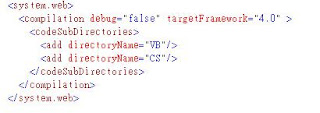
到Config底下,找到<compilation>

加入以下:
<codeSubDirectories>
<add directoryName="VB"/>
<add directoryName="CS"/>
</codeSubDirectories>
如下圖,即可協同開發


[VISUAL STUDIO]使用 aspnet_regiis 加密 or 解密Config連線字串(Aspnet_regiis use encryption or decryption Config connection string)


問題

使用 aspnet_regiis 加密 or 解密Config連線字串


解決方法

在SDK的 CMD底下:
aspnet_regiis -pef [要加密區段] 檔案位置 -prov "DataProtectionConfigurationProvider"
ex:
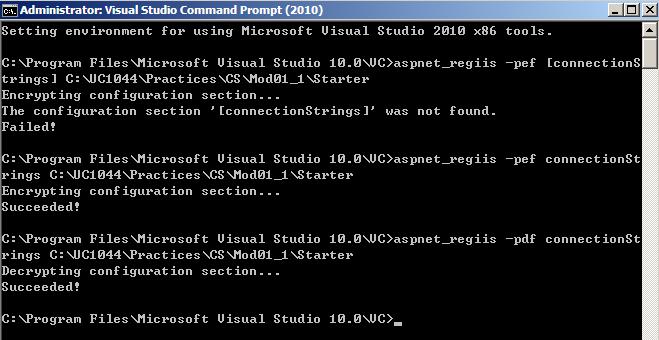
aspnet_regiis -pef  connectionStrings C:\UC1044\Practices\CS\Mod01_1\Starter
執行後畫面如下:


若在其後方加上-prov "DataProtectionConfigurationProvider"
則為指定在被執行的機器上才能執行,可以用來防止程式被移到別台機器
若要解密:
aspnet_regiis -def [要解密區段] 檔案位置
ex:
aspnet_regiis -def  connectionStrings C:\UC1044\Practices\CS\Mod01_1\Starter
執行後畫面如下:
cmd:
config:

2011年7月15日 星期五

[VISUAL STUDIO]使用 安裝精靈配合iexpress封裝精靈佈署程式執行外部exe(Using the Setup Wizard deployment wizard with iexpress package execute external exe program)


問題

使用 安裝精靈配合iexpress封裝精靈佈署程式執行外部exe


解決方法

1.在VISUAL STUDIO新增安裝精靈專案:
0.1

2.安裝精靈畫面:
0.2

3.選擇安裝程式類型:
0.3

4.選擇需輸出檔案:
0.4

4.1加入所需資源:
0.5

5.按下確定後,產生安裝專案:
0.6

6.右鍵=>建立安裝檔
0.7

7.所封裝出來的安裝檔
0.8

8.開始=>執行=>iexpress
1

9.佈署精靈畫面:
2

10.選擇佈署方式:
3

11.輸入title:
4

12.確認畫面是否需要:
5

13.授權合約是否需要:
6

14.點選新增加入要封裝的檔案:
7

需注意的是,若安裝程式非單一個執行檔,則須將安裝程式封裝成單一執行檔

15.選擇安裝程式進入點:
8

16.安裝後執行程式位置:
9

17.是否需顯示過程畫面:
10

18.執行完成後顯示訊息:
11

19.封裝後的檔案名稱:
12

20.安裝後是否重新啟動:
13

21.按下下一步壓縮:
15
16

22.完成畫面:
17

23.產生的封裝執行檔
18

2011年4月11日 星期一

[ReportViewer]解決 編譯器錯誤訊息: CS0433: 'c:\WINDOWS\assembly\GAC_MSIL\Microsoft.ReportViewer.WebForms\ 8.0.0.0__b03f5f7f11d50a3a\Microsoft.ReportViewer.WebForms.dll' 和 'c:\WINDOWS\assembly\GAC_MSIL\Microsoft.ReportViewer.WebForms\ 9.0.0.0__b03f5f7f11d50a3a\Microsoft.ReportViewer.WebForms.dll' 兩者中都有型別 'Microsoft.Reporting.WebForms.ReportViewer' =>升級到9.0 問題


問題

編譯器錯誤訊息: CS0433: 'c:\WINDOWS\assembly\GAC_MSIL\Microsoft.ReportViewer.WebForms\ 8.0.0.0__b03f5f7f11d50a3a\Microsoft.ReportViewer.WebForms.dll' 和 'c:\WINDOWS\assembly\GAC_MSIL\Microsoft.ReportViewer.WebForms\ 9.0.0.0__b03f5f7f11d50a3a\Microsoft.ReportViewer.WebForms.dll' 兩者中都有型別


解決方法


這是由於舊專案(Visual Studio2005)升級到2008版本後,web.config 中有關report viewer的版本為8.0導致
由於Visual Studio 2008並不支援由Visual Studio 2005設計出來的報表專案,所以無法直接由Visual Studio 2008開啟由 Visual Studio 2005設計的報表專案。
解決方式:
1.Web.config
<controls>部分加入:
<add tagPrefix="rsweb"  assembly="Microsoft.ReportViewer.WebForms, Version=9.0.0.0, Culture=neutral, PublicKeyToken=B03F5F7F11D50A3A" namespace="Microsoft.Reporting.WebForms" />
<assemblies>部分移除8.0版本並加入:
<add assembly="Microsoft.ReportViewer.WebForms, Version=9.0.0.0, Culture=neutral, PublicKeyToken=B03F5F7F11D50A3A"/>
    <add assembly="Microsoft.ReportViewer.Common, Version=9.0.0.0, Culture=neutral, PublicKeyToken=B03F5F7F11D50A3A"/></assemblies>

<buildProviders>部分移除8.0版本並加入:
<add extension=".rdlc" type="Microsoft.Reporting.RdlBuildProvider, Microsoft.ReportViewer.Common,Version=9.0.0.0 , Culture=neutral, PublicKeyToken=b03f5f7f11d50a3a" />
<httpHandlers>部分移除8.0版本並加入:
<add path="Reserved.ReportViewerWebControl.axd" verb="*" type="Microsoft.Reporting.WebForms.HttpHandler, Microsoft.ReportViewer.WebForms, Version=9.0.0.0, Culture=neutral, PublicKeyToken=b03f5f7f11d50a3a"
    validate="false" />


此文參考:來源
2.若發生(Microsoft.Reporting.WebForms.ReportViewer) 與控制項的型別 (Microsoft.Reporting.WebForms.ReportViewer) 不相容。 這樣的錯誤訊息,則將原專案的參考Microsoft.ReportViewer.WebForms移除,再重新加入9.0版本的Binary

[VISUAL STUDIO]解決 錯誤: 'RSClientController' 未被定義(Resolve the error: 'RSClientController' is not defined.)


問題

在X32的Windows7底下開發ReportViewer的程式,在編譯時期都很正常,卻IIS上執行發生錯誤:
錯誤: 'RSClientController' 未被定義


解決方法
原因:
在 IIS7上ASP.NET有兩種模式,Classic Mode及Integrated Mode,web.config裡HttpHandler等設定也有兩區
<System.Web>是给Classic Mode用的
<System.WebServer>是给Integrated Mode用的。
VS2008自動加入HttpHandler設定只改了System.Web這一部分
<add path="Reserved.ReportViewerWebControl.axd" verb="*" type="Microsoft.Reporting.WebForms.HttpHandler, Microsoft.ReportViewer.WebForms, Version=9.0.0.0, Culture=neutral, PublicKeyToken=b03f5f7f11d50a3a"
validate="false" />

,但卻未在 System.WebServer區塊新增设定,而我的WebApp設定是用Integrated Mode執行,於是等於沒註冊Reserved.ReportViewerWebControl.axd,所以會發生錯誤.
在<System.WebServer>區塊下新增
<add name="Reserved-ReportViewerWebControl-axd" path="Reserved.ReportViewerWebControl.axd" verb="*" type="Microsoft.Reporting.WebForms.HttpHandler, Microsoft.ReportViewer.WebForms, Version=9.0.0.0, Culture=neutral, PublicKeyToken=b03f5f7f11d50a3a" resourceType="Unspecified" preCondition="integratedMode" />

2011年4月7日 星期四

[VISUAL STUDIO]解決 Microsoft.ReportViewer.WebForms, Version=8.0.0.0, Culture=neutral, PublicKeyToken=B03F5F7F11D50A3A 為VS哪一版本


問題

Microsoft.ReportViewer.WebForms, Version=8.0.0.0, Culture=neutral, PublicKeyToken=B03F5F7F11D50A3A 為VS哪一版本


解決方法

Microsoft VisualStudio 2005的ReportViewer為8.0版本
Microsoft.ReportViewer.WebForms, Version=8.0.0.0, Culture=neutral, PublicKeyToken=B03F5F7F11D50A3A

Microsoft VisualStudio 2008的ReportViewer為9.0版本
Microsoft.ReportViewer.WebForms, Version=9.0.0.0, Culture=neutral, PublicKeyToken=B03F5F7F11D50A3A

Microsoft VisualStudio 2010的ReportViewer為10.0版本
Microsoft.ReportViewer.WebForms, Version=10.0.0.0, Culture=neutral, PublicKeyToken=B03F5F7F11D50A3A

PublicKeyToken都是一樣的

如果ReportViewer是用10.0版本前開發的,就必須裝該版本的VisualStudio開發工具

2011年3月7日 星期一

[VISUAL STUDIO]解決 IIS已設定為應用程式,卻仍出現"在應用程式層級之外使用註冊為 allowDefinition='MachineToApplication' 的區段發生錯誤。錯誤的原因可能是虛擬目錄尚未在 IIS 中設定為應用程式。"(IIS has been set to resolve apps still appear in addition to using the app level registered as allowDefinition = 'MachineToApplication' segment error. It may be the cause of the error has not been set for the virtual directory in IIS app.)


問題

IIS已設定為應用程式,卻仍出現"在應用程式層級之外使用註冊為 allowDefinition='MachineToApplication' 的區段發生錯誤。錯誤的原因可能是虛擬目錄尚未在 IIS 中設定為應用程式。


解決方法

由於網路上都說要註冊IIS為應用程式就可以解決,但這方法試過卻不行,所以檢查了一下自己的方案,發現WebSite的網站裡,不知道被誰又包了一個WebSite,也就是WebSite裡有另一個Website,所以將另一個WebSiet提出來,問題就解決了!!
如果有這樣的問題解決不了,也可以試著找一下是否有跟我一樣的狀況

[VISUAL STUDIO]解決 Crystal Report發生"混合模式組件是針對版本 'v2.0.50727' 的執行階段建置的,無法在沒有其他組態資訊的情況下載入 4.0 執行階段中。"(Crystal Report resolve when mixed-mode component for version 'v2.0.50727' of the implementation phase of the build, can not be downloaded into the implementation phase 4.0 no other configuration information in the case of)


問題

Crystal Report發生"混合模式組件是針對版本 'v2.0.50727' 的執行階段建置的,無法在沒有其他組態資訊的情況下載入 4.0 執行階段中。
在使用VISUAL STUDIO 2010開發程式時,使用Crystal Report後,發生以下錯誤訊息:
2

解決方法


1.於config裡,找到<startup>的tag3
2.加上useLegacyV2RuntimeActivationPolicy=”true”,如下:
4

[Crystal Report]解決 發生"無法載入檔案或組件'file:///C:\Program Files\SAP BusinessObject\Crystal Report for .Net Framework 4.0\Common\SAP BusinessObject Enterprise XI 4.0\win32_x86\donet1\crdb_adoplus.dll'或其相依性的其中之一 系統找不到指定的檔案"


問題

發生"無法載入檔案或組件'file:///C:\Program Files\SAP BusinessObject\Crystal Report for .Net Framework 4.0\Common\SAP BusinessObject Enterprise XI 4.0\win32_x86\donet1\crdb_adoplus.dll'或其相依性的其中之一 系統找不到指定的檔案"
1


解決方法

在VISUAL STUDIO 2010環境下開發Crystal Report需檢查是否裝有底下程式:
官方下載網頁
SAP Crystal Reports, version for Visual Studio 2010 -
在所需要的的crdb_adoplus.dll'在以下安裝檔:
SAP Crystal Reports runtime engine for .NET Framework 4 (32-bit)
安裝完後,到目錄C:\Program Files\SAP BusinessObject\Crystal Report for .Net Framework 4.0\Common\SAP BusinessObject Enterprise XI 4.0\win32_x86資料夾底下,找到crdb_adoplus.dll
將檔案加入到參考,另外屬性copy to local設為true,如此一來就可以解決此問題

2011年3月5日 星期六

[MS Access]使用 Access 2003 vs. Access 2007(含以上版本)於VS2010使用TableAdapter 參數化查詢的用法(Use Access 2003 vs. Access 2007 (including above) in VS2010 using TableAdapter query parameter usage)


問題

使用 Access 2003 vs. Access 2007(含以上版本)於VS2010使用TableAdapter 參數化查詢的用法

'@'附近的WHERE子句錯誤

解決方法

MS Access 2003的版本所建出來的資料庫副檔名為.mdf
MS Access 2007的版本所建出來的資料庫副檔名為.accdb


VS 2010在使用TableAdapter做查詢資料的時候,以符號
'@'表示為參數如下:
1
但這方式在VS 2010可不管用,會發生如下訊息: 2
由於VS 2010內部有做些許的變動,因此參數符號請改用'?'且不須給取名稱: 3
4
當然,產生了以後,一如往常的可以使用TableAdapter作為查詢,如下 5


2011年2月22日 星期二

[WCF]解決 X64平台上無法開發以Access作為資料庫的應用程式,會發生The 'Microsoft.ACE.OLEDB.12.0' provider is not registered on the local machine.


問題

X64平台上無法開發以Access作為資料庫的應用程式,會發生The 'Microsoft.ACE.OLEDB.12.0' provider is not registered on the local machine.

最近嘗試著以WCF取代Web Service作為Web服務的平台,卻發生The 'Microsoft.ACE.OLEDB.12.0' provider is not registered on the local machine.的錯誤訊息 
,且無法解決!!!!!! 

解決方法

原因是在WCF專案屬性設定上並無法將平台由"AnyCPU"變更為"X86"平台,而作為Client端的Windows Form程式卻可以指定平台,因此可能是由於WCF是屬於Hosting的服務,因此系統若是X64則預設只能選X64的平台!

因此嘗試將開發環境由原本的X64作業系統改為在X86的系統上開發,一樣的專案卻可以如期的運行!

2011年1月18日 星期二

[WCF]解決 There was no endpoint listening at http://localhost:1104/MyService.svc that could accept the message. This is often caused by an incorrect address or SOAP action. See InnerException, if present, for more details.


問題

There was no endpoint listening at http://localhost:1104/MyService.svc that could accept the message. This is often caused by an incorrect address or SOAP action. See InnerException, if present, for more details.
當在開發WCF服務的時候,出現此錯誤:
Capture
There was no endpoint listening at http://localhost:1104/MyService.svc that could accept the message. This is often caused by an incorrect address or SOAP action. See InnerException, if present, for more details.

解決方法

看詳細說明:
2
指出問題是無法連到remote server
但由於是處於開發階段,怎會有remote server呢?原因是出在ASP.NET的Development Server尚未啟動,所以處於開發時期的wcf service找不到http://localhost:1104/MyService.svc 這個port為1104的service
解決方式如下:
在MyServices.svc按下右鍵=>選擇使用瀏覽器檢視
Capture3
你就會看到ASP.NET Development Server自動啟動了
Capture4
如果錯誤一樣發生,請檢查一下WCF Service的config所設的<endpoint/>是否位置正確

熱門文章